In today's interconnected world, maintaining a secure digital lifestyle is paramount. Cybersecurity habits play a crucial role in safeguarding our online presence and protecting sensitive information. Let's delve into the top practices that can help fortify your digital defenses and keep cyber threats at bay.
Importance of Cybersecurity Habits
Developing good cybersecurity habits is essential in today's digital age to ensure the safety and security of our personal information and online activities. By following best practices and staying vigilant, individuals can significantly reduce the risk of falling victim to cyber threats.
Without proper cybersecurity habits, individuals and organizations are vulnerable to a wide range of potential risks:
Examples of Potential Risks
- Identity theft: Cybercriminals can steal personal information such as social security numbers, credit card details, and passwords to commit fraud and financial crimes.
- Phishing attacks: Hackers use deceptive emails and websites to trick users into revealing sensitive information or downloading malicious software.
- Ransomware: Malware that encrypts files on a victim's device and demands payment for their release, disrupting operations and causing financial losses.
- Data breaches: Unauthorized access to sensitive data can lead to reputational damage, financial repercussions, and legal consequences for individuals and businesses.
The impact of cybersecurity breaches can be devastating for both individuals and organizations. Loss of sensitive information, financial losses, damaged reputation, and legal ramifications are just a few of the consequences that can result from a successful cyber attack. It is crucial to adopt and maintain good cybersecurity habits to protect ourselves and our digital assets from these threats.
Strong Password Practices
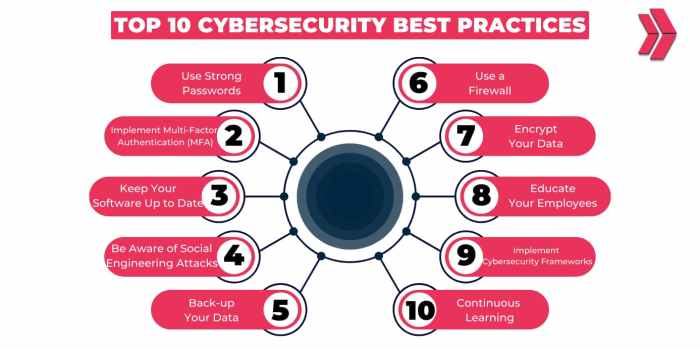
Using strong and unique passwords is crucial in maintaining cybersecurity in the digital world. It serves as the first line of defense against cyber threats and unauthorized access to personal information.
Importance of Complex and Unique Passwords
- Complex passwords consisting of a combination of letters, numbers, and special characters are harder for hackers to crack.
- Using unique passwords for each account reduces the risk of multiple accounts being compromised if one password is exposed.
- Regularly changing passwords enhances security by minimizing the chances of unauthorized access over time.
Benefits of Password Managers
- Password managers help generate and store strong, unique passwords for each account securely.
- They simplify the process of managing multiple passwords across various platforms.
- By using a password manager, users can easily access their passwords while ensuring they remain encrypted and protected.
Significance of Regularly Updating Passwords
- Regularly updating passwords reduces the risk of falling victim to password-related attacks, such as brute force or dictionary attacks.
- It ensures that old or compromised passwords are no longer valid, enhancing overall account security.
- Updating passwords periodically is a proactive measure to stay ahead of potential security threats and safeguard sensitive information.
Multi-Factor Authentication (MFA)
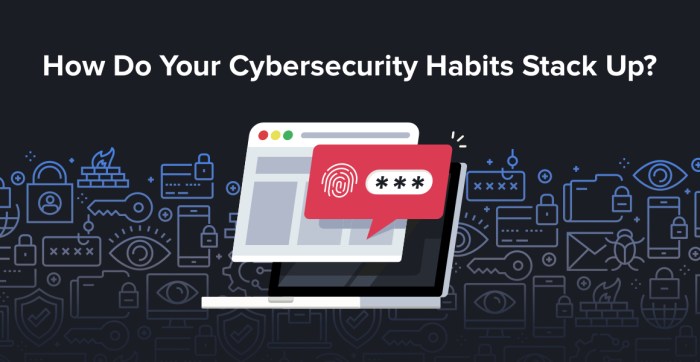
Multi-Factor Authentication (MFA) is a security measure that requires users to provide two or more verification factors to access an account, adding an extra layer of security beyond just a password. This helps to significantly reduce the risk of unauthorized access to sensitive information.
Types of MFA Methods
- Something you know: This can be a password, PIN, or security question.
- Something you have: This could include a smartphone, security token, or smart card.
- Something you are: This refers to biometric data like fingerprints, facial recognition, or retinal scans.
Effectiveness of MFA
Multi-Factor Authentication is highly effective in preventing unauthorized access because even if a hacker manages to obtain one factor, they would still need the additional factors to gain entry. This significantly enhances the security of accounts and sensitive data, making it much harder for cybercriminals to breach.
Software Updates and Patch Management
Keeping your software and devices up to date with the latest patches is crucial for maintaining cybersecurity in your digital lifestyle. Failure to do so can leave your devices vulnerable to cyber threats and attacks
Importance of Software Updates
Regular software updates and patch management are essential for addressing security vulnerabilities and fixing bugs that can be exploited by cybercriminals. By staying current with software updates, you can ensure that your devices are protected against the latest threats and malware.
Risks of Running Outdated Software
Running outdated software versions can expose your devices to various risks, including security breaches, data theft, and malware infections. Cybercriminals often target vulnerabilities in older software versions to exploit them for their malicious activities.
Tips for Enabling Automatic Updates
- Enable automatic updates on your devices to ensure that you receive the latest security patches and bug fixes in a timely manner.
- Regularly check for updates and configure your devices to download and install them automatically.
- Make sure that all software applications, including operating systems, web browsers, and antivirus programs, are set to update automatically.
Phishing Awareness
Phishing is a deceptive tactic used by cybercriminals to trick individuals into revealing sensitive information, such as usernames, passwords, credit card details, or personal data. These attacks are usually carried out through emails, messages, or websites that appear legitimate but are actually designed to steal information.
Common Phishing Techniques
- Phishing emails: Cybercriminals send emails pretending to be from a trusted source, like a bank or a company, asking for personal information.
- Phishing websites: Fake websites are created to mimic legitimate sites, prompting users to enter their login credentials or financial details.
- Spear phishing: A more targeted approach where cybercriminals tailor the phishing messages to specific individuals or organizations, making them more believable.
Tips to Identify and Avoid Phishing Attacks
- Avoid clicking on links or downloading attachments from unknown or suspicious sources.
- Check the sender's email address for any discrepancies or misspellings that may indicate a phishing attempt.
- Verify the legitimacy of a website by checking the URL for inconsistencies or using tools like Google Safe Browsing.
- Be cautious of urgent or threatening language in messages that pressure you to act quickly.
- Enable spam filters on your email accounts to help filter out potential phishing emails.
Secure Wi-Fi Practices
When it comes to cybersecurity, securing your Wi-Fi networks is crucial in protecting your personal information and sensitive data from potential threats. Whether you're at home or using public Wi-Fi, following best practices can help minimize the risk of unauthorized access and data breaches.
The Importance of Securing Home and Public Wi-Fi Networks
Securing your home Wi-Fi network is essential to prevent unauthorized users from accessing your internet connection and potentially intercepting your data. Public Wi-Fi networks, on the other hand, are often unsecured and pose even greater risks as they are frequented by a large number of users, making them prime targets for hackers.
When you connect to an unsecured Wi-Fi network, your sensitive information such as login credentials, financial details, and personal data can be easily intercepted by cybercriminals. This can lead to identity theft, financial loss, and other serious consequences.
Best Practices for Securing Wi-Fi Networks
- Use strong encryption: Enable WPA2 or WPA3 encryption on your Wi-Fi router to secure your network and prevent unauthorized access.
- Change default passwords: Replace the default password on your Wi-Fi router with a strong, unique password to enhance security and prevent easy access by hackers.
- Enable network security features: Utilize firewall settings, MAC address filtering, and other security features provided by your router to add an extra layer of protection.
- Update router firmware: Regularly update your router's firmware to patch security vulnerabilities and ensure optimal security measures are in place.
Conclusive Thoughts
As we wrap up our discussion on top cybersecurity habits for digital lifestyle, it's evident that being proactive in implementing these practices can significantly enhance your online security. By adopting strong password practices, utilizing multi-factor authentication, staying vigilant against phishing attempts, and securing your Wi-Fi networks, you can minimize the risk of falling victim to cyber threats.
Stay informed, stay secure, and stay protected in the digital realm.
FAQ Explained
How often should I update my passwords?
It is recommended to update your passwords at least every three to six months to maintain security.
What are some common signs of a phishing attempt?
Common signs include unsolicited emails asking for personal information, urgent requests for action, and suspicious links or attachments.
Why is securing Wi-Fi networks important?
Securing Wi-Fi networks helps prevent unauthorized access to your internet connection and sensitive data transmitted over it.